
Notifications
Send the Notion changes people need to act on, directly to Discord.

Docs, onboarding updates, and pricing changes are ready to share.
- Status
- Ready to post
- Owner
- Amelia
- Priority
- High
✏️ Amelia updated item Status to Ready to post
April launch notesDocs, onboarding updates, and pricing changes are ready to share.
- Status:
- Ready to post
- Owner:
- Amelia
- Priority:
- High
Check the connections once
- The Notion workspace and Discord server are connected.
- NotiCord can reach the pages or database you want to watch.
- NotiCord can View and Send Messages in the destination channel.
Build one useful rule
Send a card to #launch-updates whenever an item in Release Train becomes ready to post.
Name the rule and choose what to watch
Open Notifications, select Create notification rule, and use a name you will recognize in history. For this workflow, choose Database items and Release Train.


Choose where the card should arrive
Send to one Discord channel or one fixed member. Channel rules can add role and member mentions later. Direct-message rules stay private and skip extra mentions.
Watch Status changes that become ready
Choose Real-time and Item updates; remove New items and turn off Content changes. Keep Property changes and select Status under Notify only when these properties change. In Filters, set Status is Ready to post. Watching Status catches the change; the filter checks its new value. Turn Send fewer notifications on to combine repeated changes to the same item, or turn it off for individual notifications.

Keep the card focused, then test it
Under What should it show?, keep only the fields someone needs for the next step. Select Create rule, then make one fresh matching change in Notion.

Choose the right delivery
Real-time
Send matching new, updated, deleted, or comment events. Optionally combine repeated changes to the same page or comment.
Best for handoffs and alertsScheduled
Send the latest matching changes on a daily, weekly, or eligible hourly schedule.
Best for review windowsNeed a current list of everything that matches now? Use Scheduled Summaries instead.
Route each page to its discussion
For real-time notifications, choose Thread linked to each page to send each page's card to its recorded discussion. Create commands with a private discussion and Show Discord chat in Notion record these relationships. Pages without a thread are skipped; ambiguous destinations and closed or locked threads show a complete error. Scheduled-change summaries keep fixed destinations. Existing page/comment combining delays remain unchanged.
Forwarded comments are visible to everyone in that thread, including the requester. Noticord does not distinguish public replies from internal support notes. Use either comment notifications or a custom comment-forwarding Automation to avoid duplicate replies. See the Ticket support guide.
Keep notifications useful
Use database filters when an item must still match a workflow state before the card goes out.
Limit update rules to the supported properties that should actually wake up the team. The rule's When section names watched properties and saved filters. If several properties are watched, select + more properties to see the rest. Scheduled rules also say when NotiCord checks for those changes.
Keep the notification line, title, and only the fields or quick actions people need to respond.
Need the full option list?
Sources, events, and matchingAll pages, databases, selected pages, filters
All pages is the fastest broad rule. Database items unlocks property filters, watched properties, database fields, and property actions. Selected pages can watch one page, its child pages, or both.
Real-time rules can watch new, updated, deleted, and comment events. Filters decide whether an item still matches before sending. For updates, choose content changes, property changes, or both.
Send fewer notificationsCombine changes to the same page or comment
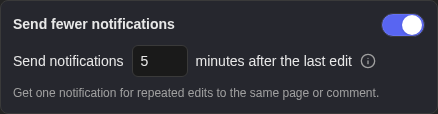
Choose a wait of 1 to 60 minutes. Each matching change restarts the wait, then NotiCord sends one notification with the latest content. Different pages and comments stay separate. New real-time rules start with Send fewer notifications off. Turning it on starts with a 5-minute wait. Saved rules keep their selected setting.
A new comment and its edits can combine before its notification starts sending. Later comment edits do not send another notification. Deleting a comment cancels its pending notification; deleting a page cancels its pending changes and keeps the usual deletion notification.
Pending on the rule shows notifications still waiting and an estimated next send time. Changing, turning off, or deleting a rule cancels its old pending notifications. Filters and delivery access are checked again before sending. Automations and automatic comment-mention DMs keep their existing timing.
Scheduled changesRows, details, frequency, mentions
Scheduled changes group new, updated, and deleted items since the previous run. Comments stay real-time. Use Shown in each row for list columns and add Details button when people need the full item card or quick actions.
Daily and weekly schedules normally run during the chosen local hour. If NotiCord cannot check then, its next healthy check runs the latest missed schedule once instead of sending a backlog for every missed interval. A rule created, changed, or turned on after that scheduled time waits for the next occurrence. Hourly schedules require Standard or Pro.
Card content and quick actionsFields, language, pings, buttons
Choose the notification line, title, content, and database fields under What should it show?. Card language localizes NotiCord text and dates. Additional mentions add a Mentioning line to channel cards, while Ping people in Discord controls linked-user pings from visible People fields.
Add comment and Upload files work as page actions. Status, Select, and People actions require a database source.
Drafts, health, and troubleshootingSilent setup, first run, recovery
Save draft keeps a rule silent. Drafts use a rule slot, but they do not send, schedule, appear in history, or appear in the public API. A new rule starts at Waiting for first run and becomes Active after a successful matching event.
If cards do not arrive, use Notifications are not sending. If buttons are missing or fail, use Quick actions are missing or failing.