
Create Notion Pages
Turn a short Discord form into a Notion page, task, bug report, or ticket.
Checkout crashes on mobile
Opened checkout from pricing, tapped Pay, saw an error.
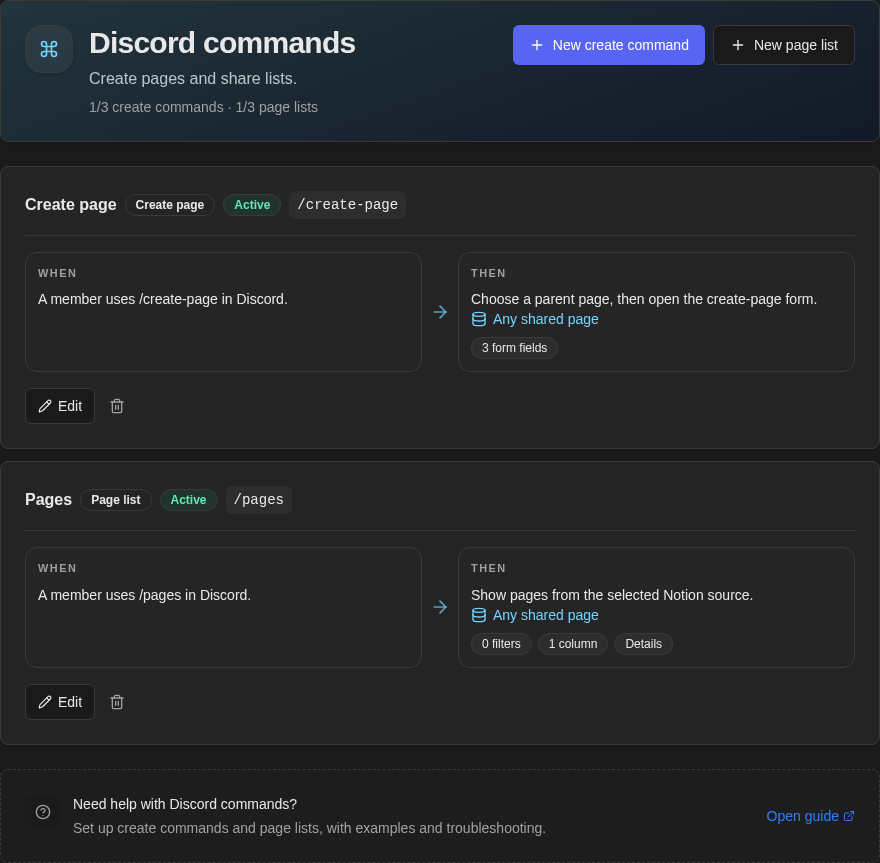
The Commands page shows create commands and page lists together. Create page identifies intake commands; When and Then show how each command starts and what it does. The header shows a separate allowance for each type, including saved drafts. Open a command to review its form fields and other details.
Create the command
Open Discord → Commands. If setup created /create-page, edit it when it fits; otherwise select New create command.
- 1
Name the command
Set the dashboard name and the slash command people will type in Discord.
- 2
Choose the destination
Decide whether each person chooses a parent or every page uses one fixed destination.
- 3
Choose the form and result
Add up to five fields, then choose what the private confirmation card shows.
- 4
Add optional Discord behavior
Add Quick actions, a message action, or a private thread. Then create the command or save a draft.
Choose where pages go
- Choose in Discord
- Ask for a parent each time with the slash command. A panel button can set one parent page for everyone using that button.
- Selected database
- Always use one database and add its supported properties to the form.
- Selected parent page
- Always use one page, database item, or project hub.

Ways to start the command


Private thread: Choose a Thread channel. NotiCord starts a private thread there, adds the submitter and configured people or roles, then embeds the conversation read-only in Notion.
Limits and recovery
- Forms and files: Add up to five form fields and upload up to five files per run. Files from a selected message reach Notion only when the form includes Attachments.
- Drafts: A draft uses a create-command slot but is not available in Discord until you finish it.
- Missing or failing command: Use Commands are missing or failing.