Find a missing Notion database
No databases appear, or only some are missing? The first step is the same: give NotiCord access to the database you want.
Connect it in Notion
Open the missing database in Notion. Open ••• → Connections, then add NotiCord for Discord to that database.
 NotiCord for Discord
Your menu may say Add connections instead. For a linked database, connect the original source.
Check again in NotiCord
In the NotiCord editor, choose the workspace that contains your database.
No databases appear
Select Check again.
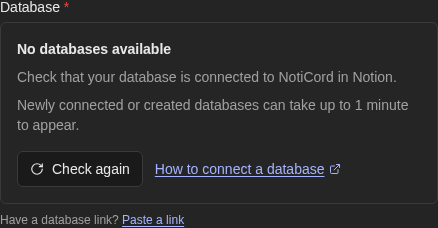
Only some are missing
Open the field and select Refresh list.
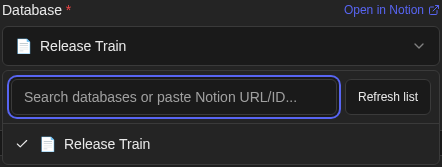
On mobile, use the circular-arrow button.
Still missing? Paste its link
Copy the database link from Notion. Use Paste a link below an empty field, or paste it into the dropdown’s search box.
If you see “NotiCord can’t access this source”
The database may not be connected to NotiCord yet. Pasting a link checks access; it does not grant it.
- Check that this database’s Connections include NotiCord for Discord.
- Check that the link points to the database you want and that you selected its workspace. For a linked database, use the original source.
- If the source is archived or in the trash, restore it in Notion or choose another source.
After connecting the database, wait up to 1 minute. Then clear the link field and paste the link again.
Other situations
- Cannot add the connection
- Ask your Notion workspace owner for help. On Enterprise plans, they can restrict who adds connections to pages. Notion’s instructions.
- Connection expired or revoked
- Open NotiCord Settings and select Reconnect.
- A page is missing
- Connect that page using step 1, wait up to 1 minute, then paste its link into the page field.
- Wrong source type
- Follow the picker message to choose the matching page or database option, then paste the link again.
Still stuck? Email support or ask in Discord.